UX & Design
Seek and Ye Shall Find: The UX of Good Site Search
February 17, 2025 · Josh Crandall
Written by
Josh Crandall
APAX Software
Navigating a complex website can sometimes feel like searching for a needle in a haystack, but a well-designed site search is the magnet that makes finding what you are looking for effortless. Good site search is more than just a convenience—it’s a lifeline for users navigating sprawling websites with diverse content and audiences. Think of it as the GPS of your website: when designed well, it’s a seamless guide. When it’s clunky, users might as well be lost in a maze. Let’s dive into what makes site search shine and learn how APAX Software has come to excel in designing robust search experiences for clients like UK HealthCare and PC(USA).
Why Site Search Matters
Site search isn’t just a feature, it’s often a necessity for users seeking specific information on content-rich websites. From finding the nearest clinic to uncovering a decades-old theological document, the goal is the same: speed, accuracy, and relevance. Research from the Nielsen Norman Group shows that users who interact with site search often convert at a higher rate because they come with intent and know what they’re looking for.
But not all site searches are created equal. Poor indexing with little customization and prioritization from off-the-shelf search solutions in tandem with poor content management and SEO will quickly make search a pain point for users. This will typically result in either an exit from the site, or turning to Google to find what they are looking for.
To design an effective search, you need to understand your content and your users. You need to anticipate users’ needs, and make the search experience as intuitive as possible. Here’s how UK HealthCare and PC(USA) have mastered this art.
Best Practices for Site Search Design
Drawing insights from industry thought leaders like the UX Design Institute, IXDA, and the Nielsen Norman Group, here are some golden rules for designing site search:
- Understand User Intent: Dive into analytics and user feedback to identify what people are searching for. Prioritize their needs.
- Keep It Visible: A search bar shouldn’t be hidden in a corner. Make it prominent, especially on content-heavy pages.
- Autocomplete and Suggestions: Guide users with predictive text and related queries, saving them time and effort.
- Faceted Search and Filters: Enable users to refine results by categories like date, location, or type. This is especially useful for websites with diverse audiences.
- Handle Errors Gracefully: No results? Offer suggestions or alternative queries instead of a dead end.
- Test and Iterate: Use heatmaps, A/B testing, and surveys to continuously refine your search experience.
The Laws of UX Applied to Site Search
Many principles from the Laws of UX are directly applicable to search design:
- Jakob’s Law: Users spend most of their time on other websites, so align your search functionality with familiar patterns.
- Hick’s Law: Simplify decision-making by presenting clear options for filters and categories.
- Aesthetic-Usability Effect: A clean, well-designed search interface fosters trust and usability.
Spotlight: UK HealthCare’s Search Experience
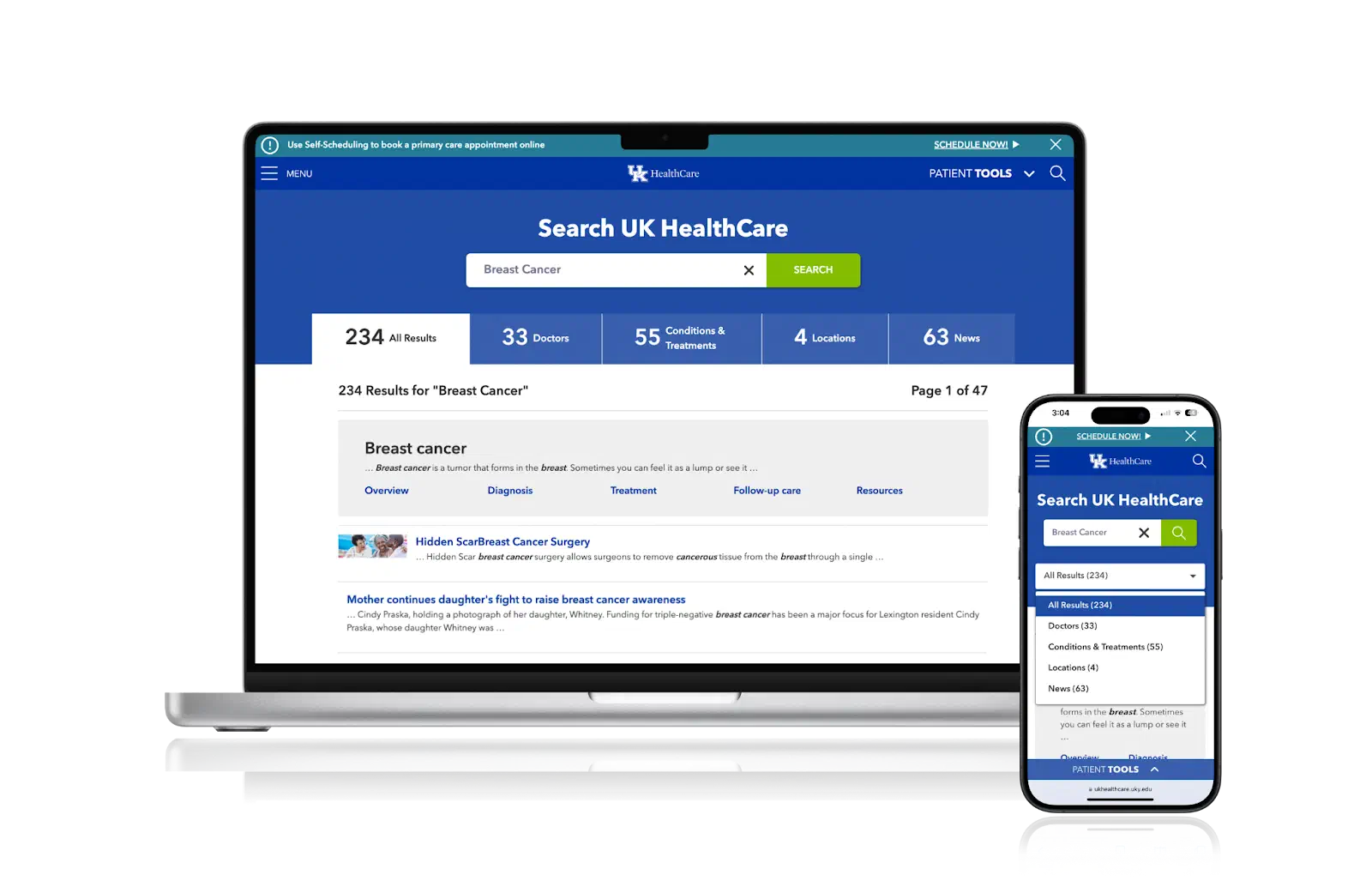
UK HealthCare’s website serves a wide array of users—patients, caregivers, researchers, and medical professionals. To create a robust, intuitive, and effortless experience, the search tool features:
- Predictive Search Suggestions: As users type, the search bar suggests relevant terms, saving time and reducing effort.
- Filters for Precision: Post-search, users can narrow results by categories such as specialties, locations, or providers. This is a lifesaver for patients looking for specific services.
- Plain Language Parsing: Not everyone speaks “medicalese.” The search engine understands layperson queries like “heart doctor” and translates them into actionable results.
- Mobile Optimization: Given the high likelihood of patients searching on mobile devices, UK HealthCare’s search interface organizes, consolidates and reduces otherwise long sections of content and translates desktop UI elements into touch-friendly mobile ones.

Spotlight: PC(USA)’s Search Experience
The Presbyterian Church (U.S.A.) website caters to a different but equally diverse audience—from clergy to congregants and historians. Their search design stands out for:
Real-time autocomplete and categorized search results preview: This gives users the ability to one-click straight to a specific piece of content from the search bar without having to navigate the site search page.
Robust Categorization: Results are grouped by content type, such as news articles, resources, and event listings, making it easy to find what you’re after.
Advanced Filters: Users can refine their search by publication date, author, or topic, helping them pinpoint the exact document or resource they need.
Rich Snippets: Search results include previews, so users can quickly assess relevance before clicking.
Support for Broad and Narrow Queries: Whether someone searches for “climate change theology” or just “climate,” the system delivers meaningful results.


Wrapping Up
A great site search doesn’t just help users find what they’re looking for—it enhances their entire experience on your website. By learning from standout examples like UK HealthCare and PC(USA) and following best practices, you can design a search experience that’s intuitive, powerful, and user-focused.
Remember: Search isn’t just a feature. It’s a conversation between your website and its users. Make sure you’re listening.